

一、页面&显示-底部设置
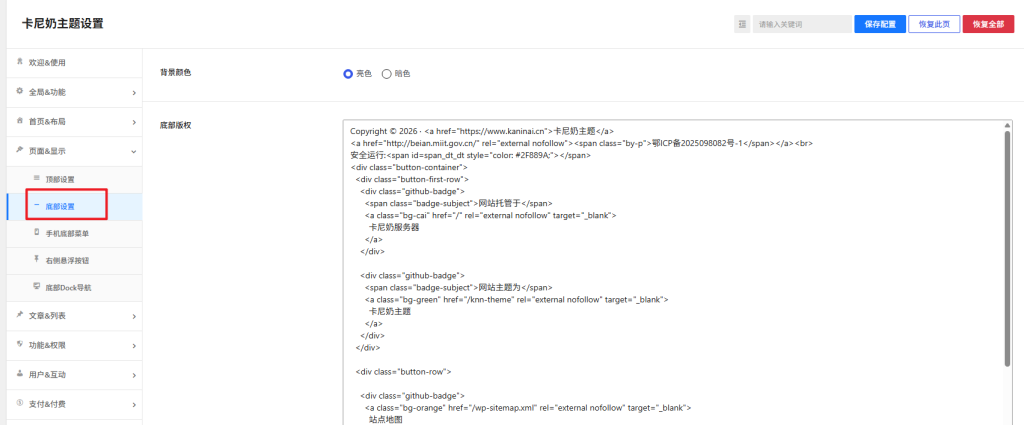
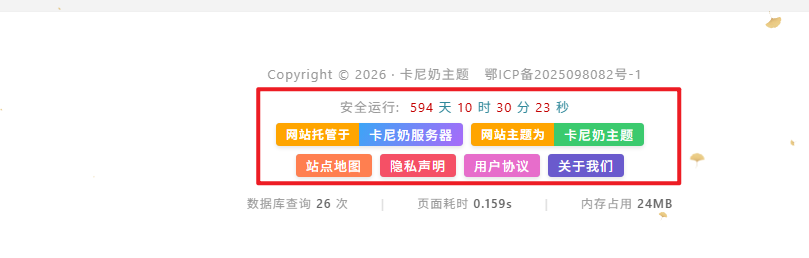
安全运行:<span id=span_dt_dt style="color: #2F889A;"></span>
<div class="button-container">
  <div class="button-first-row">
    <div class="github-badge">
      <span class="badge-subject">网站托管于</span>
      <a class="bg-cai" href="/" rel="external nofollow" target="_blank">
        卡尼奶服务器
      </a>
    </div>
    <div class="github-badge">
      <span class="badge-subject">网站主题为</span>
      <a class="bg-green" href="/knn-theme" rel="external nofollow" target="_blank">
        卡尼奶主题
      </a>
    </div>
  </div>
  <div class="button-row">
    <div class="github-badge">
      <a class="bg-orange" href="/wp-sitemap.xml" rel="external nofollow" target="_blank">
        站点地图
      </a>
    </div>
    <div class="github-badge">
      <a class="bg-red" href="/" rel="external nofollow" target="_blank">
        隐私声明
      </a>
    </div>
    <div class="github-badge">
      <a class="bg-fen" href="/" rel="external nofollow" target="_blank">
        用户协议
      </a>
    </div>
    <div class="github-badge">
      <a class="bg-purple" href="/" rel="external nofollow" target="_blank">
        关于我们
      </a>
    </div>
  </div>
</div>
二、全局&功能-自定义代码
1、自定义CSS样式
.button-container {
  display: flex;
  flex-direction: column;
  align-items: center;   /* 整体容器居中 */
}
.button-row {
  display: flex;
  flex-wrap: wrap;
  justify-content: center;  /* 由 flex-start 改为 center */
  gap: 8px;
  margin-bottom: 10px;
}
.button-first-row {
  width: 100%;
  display: flex;
  justify-content: center;  /* 由 flex-start 改为 center */
  gap: 8px;
  margin-bottom: 8px;
}
.github-badge {
  display: flex;
  border-radius: 4px;
  font-size: 12px;
  color: #fff;
  line-height: 15px;
  background-color: #abbac3;
  overflow: hidden;
  text-shadow: none;
  box-shadow: 0 2px 4px rgba(0,0,0,0.1);
  transition: transform 0.2s ease;
}
.github-badge:hover {
  transform: translateY(-2px);
  box-shadow: 0 4px 8px rgba(0,0,0,0.15);
}
.github-badge .badge-subject {
  display: inline-block;
  background-color: #ffa500;
  padding: 4px 8px 4px 10px;
  font-weight: 600;
}

.github-badge a {
  display: inline-block;
  padding: 4px 10px;
  text-decoration: none;
  color: #fff !important;
  font-weight: 500;
}
.github-badge .bg-cai   { background-image: linear-gradient(120deg, #3ca5f6, #a86af9); }
.github-badge .bg-green { background-color: #3bca6e; }
.github-badge .bg-blue  { background-color: #007bff; }
.github-badge .bg-orange{ background-color: #ff7f50; }
.github-badge .bg-red   { background-color: #f55066; }
.github-badge .bg-fen   { background-color: #e76dcb; }
.github-badge .bg-purple{ background-color: #6a5acd; }
@media screen and (max-width: 767px) {
  .footer-container .button-container .github-badge .badge-subject,
  .footer-container .button-container .github-badge a {
    font-size: 11px !important;
    white-space: nowrap !important;
  }
}
2、自定义javascript代码(可以设置网站运营时间)
function show_date_time(){
window.setTimeout("show_date_time()", 1000);
BirthDay=new Date("1/1/2026 1:1:1");
today=new Date();
timeold=(today.getTime()-BirthDay.getTime());
sectimeold=timeold/1000
secondsold=Math.floor(sectimeold);
msPerDay=24*60*60*1000
e_daysold=timeold/msPerDay
daysold=Math.floor(e_daysold);
e_hrsold=(e_daysold-daysold)*24;
hrsold=Math.floor(e_hrsold);
e_minsold=(e_hrsold-hrsold)*60;
minsold=Math.floor((e_hrsold-hrsold)*60);
seconds=Math.floor((e_minsold-minsold)*60);
span_dt_dt.innerHTML='<font style=color:#C40000>'+daysold+'</font> 天 <font style=color:#C40000>'+hrsold+'</font> 时 <font style=color:#C40000>'+minsold+'</font> 分 <font style=color:#C40000>'+seconds+'</font> 秒';
}
show_date_time();
BirthDay=new Date(“1/1/2026 1:1:1”);
例如:我要设置2026-08-18 开始运营的网站
BirthDay=new Date(“08/18/2026 1:1:1”);
例如:我要设置2026-08-18 开始运营的网站
BirthDay=new Date(“08/18/2026 1:1:1”);
本文为作者原创,未经授权禁止转载。转载请保留原文链接并注明出处。